I’m speaking today at WordCamp Lancaster PA. Here’s the notes of the talk:
Saturday, March 1, 2014
Your Ultimate Website Checklist - WordCamp Lancaster PA 2014

Monday, January 13, 2014
Get started with Mobile Marketing - Part 4, SMS Text Message
Can SMS Text Message Marketing help your business? It depends upon the type of business you have and the customers you serve.
So far, we’ve looked at What is Mobile Marketing in Part 1, What is Location Based Marketing in Part 2, and the best ways to implement QR Codes in Part 3.
SMS/MMS/Text Message Marketing
Much like email marketing, sms or text message marketing is a great way to reach your customers. Mobile messages have an astonishing 99% open rate. The primary difference between sms vs mms is that sms is text only, while mms can include images, audio, and video as well.
Where SMS Marketing Shines:
- Event promotions
- Promoting physical locations (discounts, specials, or new products and services)
- Integrating in to traditional media campaigns (radio, print, tv)
- Lots more
How to Opt In to SMS Marketing:
- Text a short code to a specific number from your phone
- Visit a specific page within a website to fill in via a computer
- Scan a QR code

SMS Providers:
- EZ Texting – a free way to get started building your list and pay when you are ready to send messages. Integrates with email systems. You can join mine at:
Get special offers from Courtney Engle Robertson & Simple Local Business
- Trumpia – one stop shop for all multimedia marketing, including email services.
I’d love to hear if you implement SMS marketing into your strategy this year. Leave a comment below.

Get started with Mobile Marketing - Part 4, SMS Text Message
Monday, December 16, 2013
Get Started with Mobile Marketing - Part 3 QR Codes
In parts 1 and 2, we looked at other things to do before jumping in to QR codes. If you haven’t yet read those posts, go do them now.
To scan a QR code, I like the Google app on iOS, using the Google Goggles feature. I aspire to consolidate the number of apps I have on my iPhone, and a stand-alone QR code reader isn’t necessary. Just click in the search box, and select the camera icon to scan the qr code.

QR Codes: A Fancy Barcode
When explaining what a qr code is to people, I liken it to a fancy bar code that can do a lot of things. Most bar codes are designed for cash register scanners to input the price and monitor inventory. With a smartphone that has a camera built in, QR codes are capable of much more:
- Direct people to a website (make sure it is completely mobile-ready) which ultimately can be used to do a wide variety of things
- Bookmark a website
- Make a phone call
- Send an SMS
- Send an E-mail
- Create a vCard (saves a contact to your address book)
- Create a meCard (similar to a vCard)
- Create a vCalendar Event (save an event to your calendar app)
- Launch Google Maps
- Launch Bing Maps
- Geographical coordinates (for other mapping)
- Android Market Search
- Youtube
- Encode latest Tweet
- Tweet on Twitter
- Twitter Profile Image Overlay
- Blackberry Messenger PIN
- Wifi Network for Android (connect to your friend’s wifi at their house by scanning a QR code without entering a password)
- Free formatted text (display a plain text document on the phone)
I use an app on my Mac to create high quality QR codes.
QR Codes Are Misused
QR codes have been widely adopted by Japanese smartphone users, but haven’t gotten the same fanfare in North America. Primarily because marketers rushed to implement them without considering what happens from the users perspective. Common problems include:
- The QR code is a low-quality graphic (these need to be high-resolution files the further away the user is scanning)
- QR codes redirecting people to a non-mobile website (why would they want to see that on their phones?)
- No prompts for what the user will find when they scan the code or incentive to do so
- Placing the QR codes where people will likely have no mobile phone reception or is otherwise unsafe (billboards on the highway, the back of the company truck, subways, and airplanes)
- Assuming using QR codes covers all your mobile marketing needs
- Not tracking how many people scan the QR code and what action they take (how will you know if it works?)
- Putting QR codes on websites – if I’m already on the site from the computer, I don’t really want to open it on mobile (and if I ever have a reason, I can do so without your help)
For a quick read and a good laugh at the marketing blunders companies have made, see Scott Stratten‘s book: QR Codes Kill Kittens.
QR Codes Can Be Awesome
I got an early Christmas present from my parents – a new Samsung Smart TV! I started to unbox it and was slightly stumped at the stand. I needed to assemble this correctly and thought that I had, but I don’t want my new big screen tv to wobble and unexpectedly face-plant onto the living room floor. It mattered to me that every screw was exactly in place as it should. So – I scanned the helpful QR code in the packaging that auto-played a demonstration video.
I’ve also needed a quick way to move a website that I’m looking at on my computer to my iPhone (like testing my clients websites). For that, I have a Chrome extension that I right-click on the site to display a QR code that I scan from my phone.
Get Started with Mobile Marketing - Part 3 QR Codes
Thursday, December 12, 2013
Small Business Guide to Pinterest Place Pins
This is obviously ideal for destination locations, as well as promoting tourist events. However, local and small business owners can put their pins to work as well.
How to Add a Place to Your Pinterest Boards
When viewing your boards, select “edit” at the bottom:

Add your map location:

Add a place on the map:

You’ll notice the locations are accessing the Foursquare database.
How to Add Pinterest Place Pins from a computer:
After adding your pin, view the board and edit the pin to include a place.

How to add a Pinterest Place Pin from mobile:
From Pinterest on your mobile device, add a pin (bottom middle)

Find a place. This will access Foursquare’s listing of locations:

Select the correct venue, and add a photo to your pin:

You’ll need to provide a description of your pin before saving:

Pinterest Place Pins Strategy for Local and Small Business Owners:
Now that you know how to use Pinterest Place Pins, it’s time to form your strategy around why to use them.
- Pin the websites of local business owners (and consider making it a community board).
- Feature multiple boards on your business account that showcase local businesses based upon their industry
- Curate a board of your products in use around your community
- Promote events and locations where your business will be appearing
- Feature items in your store with locations mapped to them.
What are your ideas on how to make use of Pinterest Place Pins? Leave your suggestions below.
Small Business Guide to Pinterest Place Pins
Wednesday, December 11, 2013
Comments Evolved for WordPress
Have you ever wanted a way to integrate multiple comment systems on your blog? Take a look below at my commenting system. It’s Comments Evolved, and is free in the WordPress repository.

With it, users can leave a comment with Facebook or Google+, or multi-platform login systems like LiveFyre or Disqus. The default WordPress comment system is still an option as well. I’ve found it to be a bit buggy if Facebook is not the first comment system displayed, so I’ll tolerate that for now.

Using this plugin has made it super easy to reply to those that have shared the post from my site as well to either Facebook or Google+. By default, Facebook and Google+ will prompt users to submit the comment as a link to their social media accounts.
To make this plugin work with my theme (Headway), I added a bit of CSS to the Live CSS editor to hide default comments and instead only show this plugin.
div#comments display: none;
Help me put this plugin to the test by leaving a comment below.
Comments Evolved for WordPress
Tuesday, December 10, 2013
LinkedIn Showcase Page
Have you followed or created a LinkedIn Showcase Page yet? LinkedIn announced the feature as a way to highlight a niche product within a company. For instance, I may want to follow Office by Microsoft, but skip the Visual Studio content.
Learn how to follow showcase pages or create your own:

LinkedIn Showcase Page
Monday, December 9, 2013
Get Started with Mobile Marketing - Part 2 - Location-Based Marketing
For local small business owners, location-based marketing allows you to reach your target audience within your community. Before all other attempts at reaching your local audience, be sure to review Get Started with Mobile Marketing – Part 1, in which we looked at why your website needs to look good on mobile devices.
What is Location-based Marketing
Location based marketing delivers multi-media directly to the user of a mobile device dependent upon their location via GPS technology (source)
Types of Location Based Marketing
Traditionally marketing within your local community has been based on contacting the local media outlets, billboard agencies, hanging signs or fliers, and networking or word of mouth marketing. All of these methods are still in play, but now with a few modern twists.
Contact your local newspapers, tv, or radio stations to find if you can advertise on their websites and mobile apps. Additionally, check with local coupon systems like ValPak for similar services. (Protip: also connect with others following these organizations on social media sites).
Where location based marketing has evolved is online everywhere else. Remember with all suggestions below, most of these systems rely upon users accessing content from their mobile phones. What content is delivered needs to triangulate where the visitor is physically located.
Search Engine Results
When people reach for their phones to search for what they are seeking, ideally they find only local results. This happens with a variety of methods.
First, on your website you need to include schema markup that tells search engines where your business is located. This is different than merely typing the address onto your site somewhere, and having the address appear in a graphic or flash image makes it rather useless for search engines. I like using Yoast’s Local SEO for the markup.
Next, on every piece of content that you create, whether on your own website or off site, you can add meta descriptions and often location based information.
In WordPress, add your city and zipcode to the tags on your posts.

In Youtube, include your GPS location (Youtube can help you find this)

And in Flickr, add your location:

And be sure to claim your business listing on every possible page that you can. Many of these are created on your behalf and are waiting for you to verify that you are the owner. Some of these lead in to social media, like Foursquare.
By incorporating location into your content, search engines will display your local results to visitors.
Social Media Location Based Marketing
In many social network platforms, you can create ads or even status updates that are targeted to your location community.
When creating status updates in Facebook, tag your location.

When creating an offer, be sure to specify your location as well.

And if you are creating Facebook Ads, do target your audience.

Likewise, in LinkedIn, your company page can target a status update to a specific region.

Get started with Location Based Marketing
While this is by no means a comprehensive list of of all aspects of location-based marketing, hopefully it has your creativity flowing for new ways to reach your local community.
Get Started with Mobile Marketing - Part 2 - Location-Based Marketing
Tuesday, November 19, 2013
Twitter Custom Timelines
Have you ever wanted to show a series of specific tweets on your website? Twitter has introduced custom timelines to do just that via it’s Tweetdeck dashboard.

How to Create a Twitter Custom Timeline in Tweetdeck
Before you can add tweets to a custom timeline, you’ll need to create a timeline to add these tweets to. Click “A” to access the administration options.

Describe your new timeline. Remember that these are visible to others viewing your Twitter profile as well as intended to be embedded on your own website.

Adding Tweets to Custom Timelines
To add a tweet to your custom timeline, simply click on the + sign and select “add to custom timeline”

Or click and drag the tweet to the appropriate column:

How to Share Twitter Custom Timelines
To share your Twitter Custom Timeline, click on the options for that timeline. Then click the “share” link at the bottom and choose if you want to embed this, tweet a link for others to view it, or view it yourself on Twitter.

Use Twitter Custom Timelines Creatively
Now that you can make the these curated tweets appear, it’s time to put them to work for you. You can use this in a variety of ways.
- Christopher Penn shared that he is using them as testimonials of a few things, such as his newsletter or public speaking.
- Consider using custom timelines to document a developing news story
- Showcase content you have shared at a conference, like the notes of others presentations that you’ve tweeted.
What ideas do you have? Can you imagine a new way to share a Twitter Custom Timeline

Twitter Custom Timelines
Monday, November 18, 2013
Get started with Mobile Marketing - Part 1
Is your business ready to get started with mobile marketing? Before even beginning, it’s important to first understand what mobile marketing includes.
Over the course of the next few weeks, we will start reviewing each of the categories of mobile marketing, as well as exploring new areas yet emerging.
What is Mobile Marketing?
- Mobile websites
- Location-based marketing
- QR codes
- SMS messages (like email newsletters)
- Mobile ads
- Mobile paid search
- Apps
Mobile websites
Ensuring that your website works well on mobile is the first priority before venturing into any other aspect of mobile marketing. If you attempt any other thing first and customers click your call to action and land on a non-mobile website, it will only infuriate them and make you look bad.
Mobile Landing Pages
A website with mobile landing pages are useful when limiting users to a specific call to action. Like any landing page, the goal is to attract visitors to that specific page for a single purpose.
This is not meant to replace your entire website, but to only provide the necessary information. These are ideal for users that have scanned a QR code, but never a good replacement for the whole site.
Remember that if your blog post is shared to social media websites, people will be clicking through from Facebook, Twitter, Google+, or elsewhere to read your blog post. If the mobile landing page or a scaled back mobile website overrides their ability to read the blog post, something is very wrong with your settings. They want to read the blog post; help them do that!
I really like the University of Phoenix mobile landing page. It includes a click to call phone number as well as categories of service and a location finder with a big submit button that is great for thumbs.

Stand alone mobile websites
A standalone mobile website is usually proceeded with a letter m such as m.yoursite.com. This will work to automatically redirect mobile visitors to your mobile site. Essentially, you’re duplicating your entire website in a mobile version. The problem with this method is that you must be sure that you can figure many settings correctly so the Google doesn’t think that you are duplicating your website which could lead to penalties.
Mobile Themes
A mobile theme will convert your website. This approach will work if the theme for your website is not mobile responsive. I like using WP-Touch for this on my clients websites that aren’t ready to change the entire theme for their site. By adding in a plug-in for a mobile theme, the website will look good on a mobile device although it won’t look like the same theme that they get on the computer.
Mobile Responsive Design
Mobile responsive design will be the best choice when building out a new website or overhauling the team of your existing website. Mobile response of websites automatically scale every element of your entire website including photos and videos so that they display properly weather on a phone, a tablet, or any other mobile device.
This is the best solution for the look of your entire website, although mobile landing pages may still be a great option to include as well for additional elements like QR codes or links to specific mobile-only calls to action.
Next week: What is location-based mobile marketing
Because mobile marketing is such a large topic, join me next week as we review what is location-based mobile marketing.

Get started with Mobile Marketing - Part 1
Friday, November 15, 2013
Google+ Cover Photo Changes
The new Google+ profile layout changes cover photos slightly. No longer are users presented with the bottom 1/4 of the photo, but now displays the entire image. The dimensions are still large at 2120×1192 pixels, but now the full image displays. A great tutorial can be found at http://googlepluscoverphoto.blogspot.com/2013/03/Google-Plus-New-Cover-Photo-Size-Free-Templates-Download.html.

I took my cover photo a step further by turning it into an animated gif (a photo that moves).
Here it is in motion:

Create an Animated Gif for your Google+ Cover Photo
- Create a presentation in PowerPoint or Keynote
- Export the presentation as a Quicktime .mov file
- Convert the Quicktime presentation into an animated gif (I like GifBrewery)
- Upload to Google+
- For more help, watch the tutorial

Google+ Cover Photo Changes
Wednesday, November 13, 2013
WordPress 3.8 Preview
More big changes are coming to WordPress 3.8 and are focused around the administration dashboard. The latest list of features was announced at the contributor blog. The main changes to know about are:
- An overhaul to the administration interface
- Easier widgets layout in the administration interface
- Omnisearch – a search feature that scours comments, content, and everything else in your site. This is a feature already for JetPack plugin users, but is migrating to core (WordPress as it is when first installed).
- A better browsing experience to finding themes
- Making the Edit Post more closely resemble the way a post will look when published
- New Twenty Fourteen theme – This is a magazine layout and the demo is available here: http://twentyfourteendemo.wordpress.com/ and if you’re really ambitious, you can download the beta release at https://github.com/WordPress/WordPress/tree/master/wp-content/themes/twentyfourteen
WordPress 3.8 is due to ship December 12, 2013. The faster update cycle is based upon a new way that the development team incorporates new features. They have restructured teams into developing plugins that can be incorporated into core and if they don’t make the cut, they can still stand along in plugins. This new approach is leading to faster releases.


WordPress 3.8 Preview
Tuesday, November 12, 2013
Optimizing Your Website for Social Media Sharing
Have you noticed the way your content looks when it is shared on Google+, Facebook, Twitter, and Pinterest? It is important that you optimize your website for social media sharing.
Each platform can detect what type of content you are sharing and lay it out uniquely on the respective site. Types of content include:
- Google+: Articles, Blog, Book, Event, Local Business, Organization, Person, Product, and Reviews
- Facebook: Articles, Photos, Audio, Video, and more
- Twitter Cards: Summaries, Images, Galleries, Apps, Video, Audio, and Products
- Pinterest Rich Pins: Products, Recipes, Movies, and Articles
There are a number of ways to include the necessary code into your website. Examples of this code is provided on http://moz.com/blog/meta-data-templates-123. This seems like the more tedious way to accomplish the goal.
WordPress SEO by Yoast
Among the most popular WordPress plugins is Yoast’s WordPress SEO. Yoast has taken the work out of configuring all the individual social media meta data by including social setting within the plugin. The only not yet included is Pinterest’s Rich Pins. Be sure to complete these settings on your site.

Pinterest Rich Pins
If you want to include Pinterest Rich Pins on your website, ABG Rich Pins will include the proper code. Pinterest will require that you first apply to be a Rich Pins approved website. Configure the settings for AGP Rich Pins on each post on your website.

Testing Your Results
- Google: http://www.google.com/webmasters/tools/richsnippets
- Facebook: https://developers.facebook.com/tools/debug
- Twitter: https://dev.twitter.com/docs/cards/validation/validator
- Pinterest: http://developers.pinterest.com/rich_pins/validator/
Once you’ve properly configured your settings, the previews that you see on each of the links mentioned above will be how your content is displayed when others share your website to their social accounts.

Optimizing Your Website for Social Media Sharing
Monday, November 11, 2013
Social Media Sharing Buttons on Your Mobile Website
Social media sharing buttons important on your mobile website. The problem is, most methods of including social media buttons leaves the images users should click too small for their thumbs while they visit your website on their phones.

Those little icons are clickable, but really awkward to click on just one if you are visiting while on your phone. I’ve hunted for ways include sharing buttons that work better, and finally landed on AddThis’s Smart Layers.
AddThis Smart Layers
To add Smart Layers to your WordPress website, just install the plugin from http://wordpress.org/plugins/addthis-smart-layers/ and configure your settings:

You can disable features like “Recommended Content” if you don’t want that displayed.
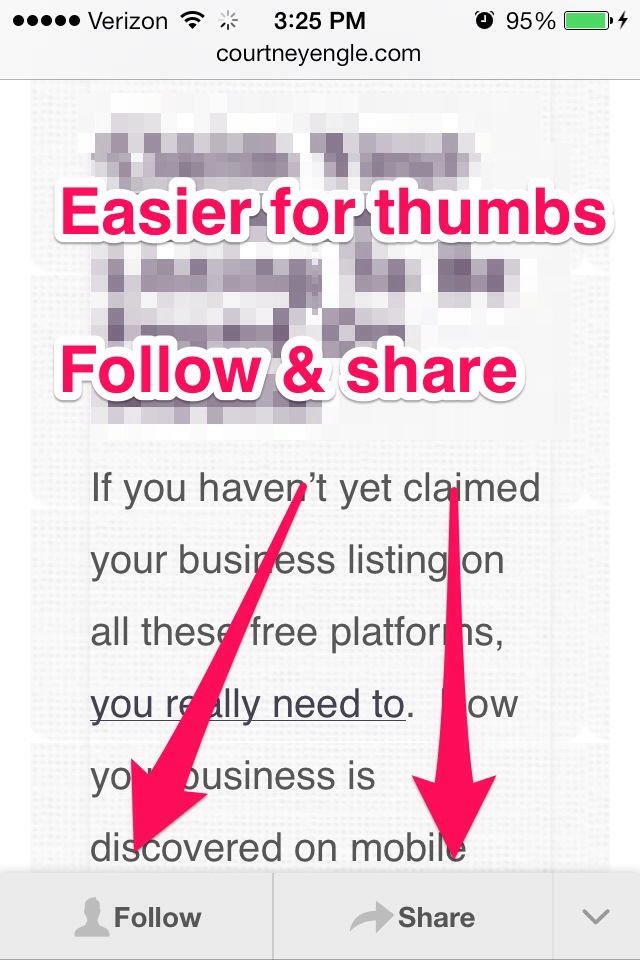
Using AddThis Social Layers, the follow and share buttons are places where they should be on mobile devices and work well for thumb clicks.

I feel like the sharing buttons are finally in the right places on desktops so as not to distract readers but yet accessible enough for those that want to share. Social media sharing buttons on your mobile website will boost the shares of your content by helping your reader more easily reach their community.
AddThis Social Metrics
An added bonus of running AddThis on your website is more detailed social media metrics than what Google Analytics alone can provide.

Related articles


Social Media Sharing Buttons on Your Mobile Website
Subscribe to:
Posts (Atom)
